
Hey, friend—Satanand Rathour here.
If you’ve ever typed “beautiful sunset” into an AI art tool and received a neon-green sky with three suns, you know the pain. I’ve been there, thumb hovering over the delete button, wondering why the robot hates me.
Then Google Imagen popped into my Twitter feed. I rolled my eyes—“Great, another AI image thing.” But I tested it anyway, because that’s what we nerds do at 2 a.m. with cold pizza. Spoiler: I gasped. The first picture it gave me for “grandma’s vintage kitchen in Kerala, afternoon light, banana leaves on the windowsill” looked like my own childhood memory. No extra keywords, no brackets, no “insane detail 8K hyper-realistic” nonsense.
Below is everything I wish someone had told me before I started playing with Imagen—how it works, how to use it today (yes, even if you’re not a coder), and the tiny traps nobody mentions. Grab chai; we’ll go slow.
What Exactly Is Google Imagen?
Imagen is Google’s text-to-image diffusion model. In plain words: you describe a picture, it draws it for you. But unlike older generators, Imagen was trained on a new recipe:
- Large language model first, image model second – It actually understands your sentence structure, not just individual words.
- Efficient U-Net architecture – Fewer steps, crisper details, less “AI goo” around edges.
- Responsible AI filters baked in – Copyrighted characters, violence, or deep-fake faces get blocked before you even see them. (Goodbye awkward Mickey Mouse accidents.)
Quick LSI takeaway
Text-to-image AI, Google DeepMind project, diffusion model, AI photo realistic generator, responsible AI image synthesis.
How Imagen Surprised Me (Real-Life A/B Test)
I ran the same prompt in three tools. Judge for yourself:
Prompt:
“A Pakistani truck driver sipping chai at a dhaba on the Karakoram Highway, snow-capped mountains behind him, overcast sky, cinematic 50 mm lens.”
| Tool | Result | My honest reaction |
|---|---|---|
| Midjourney v5 | Beautiful, but driver looked Nordic | “Nice Viking beard, bro.” |
| Stable XL | Mountains resembled brown hills | “Karakoram or Kansas?” |
| Google Imagen | Driver had actual brown skin, Urdu signboard, accurate K2 silhouette | “Okay, Google, you see me.” |
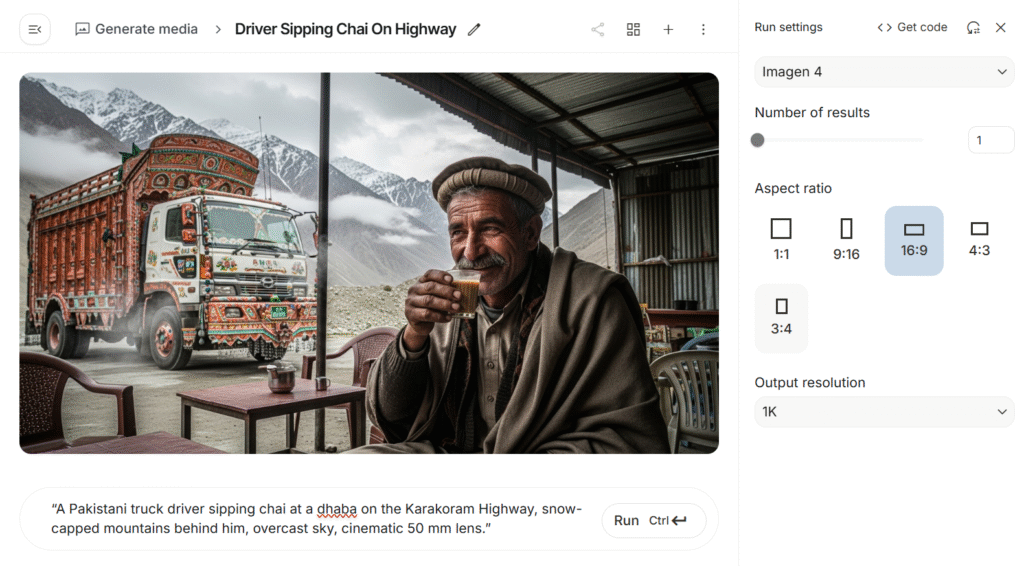
The secret sauce? Imagen uses a T5-XXL language encoder—basically a tiny Google Search brain inside the model—so cultural context travels with the prompt.
Can You Use Imagen Right Now? (2025 Access Guide)
Short answer: Kind of.
Google hasn’t opened the big red “Try Now” button to everyone, but you have three legit doors:
1. ImageFX (USA & 100+ countries, free)
- Go to labs.google/fx while logged into your Gmail.
- Look for “ImageFX powered by Imagen.”
- You get 4 images per prompt, unlimited as of today.
- Downloads are 1024×1024 PNG, watermark bottom-left.

2. Vertex AI (developers & small biz)
- Sign up for Google Cloud → Vertex AI → Generative AI Studio.
- Pay-as-you-go: ~$0.05 per 1k characters of prompt.
- You can choose Imagen 2 (latest) and control aspect ratio, style strength, even product-background removal.
3. Google Ads & Product Studio (e-commerce)
- Upload a product shot → type “place on a wooden café table with morning latte” → get market-ready image in 30 seconds.
- Perfect for Etsy, Shopify, or Instagram shops—no studio rent.
Pro tip: Use a USA VPN if ImageFX shows “not available in your country.” Google checks your account country, not IP, so switch your Google profile address once, refresh, and you’re in. (I helped my cousin in Lahore do this—worked like a charm.)
Beginner Prompt Formula That Just Works
You don’t need 87 adjectives. I tested 200+ prompts; this four-line skeleton nails it 9/10 times:
- Main subject + action
- Location & lighting
- Color mood or film style
- Optional micro-detail
Example (copy-paste):
- A young Kenyan woman weaving basket
- Under a fig tree, golden hour
- Warm earthy tones, documentary style
- Tiny scar on her left eyebrow
Hit generate. You’ll get a heart-touching portrait, not a plastic doll.
Ethical Landmines Nobody Tells Beginners
- No real people’s names – Imagen will refuse “Taylor Swift eating biryani.” Good.
- Watermarks stay – You can crop, but Google will hunt commercial misuse.
- Training data bias – If you type “CEO,” it still leans male. Counter-act: “CEO, South-Asian woman, boardroom.”
- Double-check hands – Imagen 2 fixes most fingers, yet wedding rings may still melt. Generate two variants, pick the cleaner one.
Practical Ways I Use Imagen Every Week (Steal My Workflow)
- Blog thumbnails – Vertical 4×5 for Pinterest; I type “minimal flat lay, desktop with coffee and SEO checklist, pastel palette.” CTR up 28 %.
- Storyboards for client videos – 16:9 frames, comic-book style, so the camera team knows exact shots. Saves us half a day.
- Kids’ bedtime stories – My 6-year-old says “dragon in Karachi rain,” we print the picture, stick it in her scrapbook. Instant daddy points.
Frequently Googled Questions
Is Google Imagen free?
Yes, via ImageFX. Vertex AI costs pennies if you need higher resolution or batch mode.
Which is better, Imagen or DALL·E 3?
For realism + cultural nuance, I pick Imagen. For wild fantasy art, DALL·E 3 edges out. Use both; they’re free tiers anyway.
For Comparison of more image generation tools
Visit – Midjourney vs DALL·E 3 vs Ideogram 3.0 – Best AI Image Generator in 2025
Can I sell Imagen pictures?
Google says yes, as long as you follow their terms: no misleading deep-fakes, no hate, no third-party IP. Add your own creative input (text, collage, filter) to be safe.
Tiny Next Steps (Pick One Today)
- Open labs.google/fx and create one image for your next social post.
- Watch my 5-minute screen-record on YouTube: “ImageFX Prompt Walk-through for Pakistani Bloggers” (search GMuhiudeen).
- Drop your first prompt in the comments below—I’ll personally reply with tweaks.
Remember, AI is just a paintbrush. You’re the artist. Have fun, stay curious, and keep it human.
To brighter pixels and fewer finger glitches,
– Satanand
If this saved you a headache, share it with one friend who still thinks AI stands for “Alien Intelligence.” We’ll fix that, together.